Desk and Parking Booking in One Flow | OfficeRnD Workplace

6 mins read Published: Oct 27, 2026 Last updated: Oct 27, 2026
Booking a desk was never the whole commute. For anyone who drives to the office, the day starts in the car park, and until now that part has been left to luck. Parking was a separate booking step that was easy to forget. And when the car park was full, there was no way to know when a spot opened up again.
Starting today, OfficeRnD Workplace closes that gap. Parking now sits right inside the desk booking flow. And when every spot is taken, employees can join a waitlist instead of circling the block or refreshing the Dashboard.

The result is fewer surprises at the barrier, fewer “can you hold me a spot?” messages for facility teams, and an office day that starts the way it should.
Two new parking features close the gap between “I booked a desk” and “I made it to my desk.”
Both are available now on the Pro plan.

Until now, drivers had two things to remember: book a desk, then go somewhere else in the product and book parking. Forget the second step, and you find out at the barrier.
Combined booking folds parking straight into the desk booking flow. When an employee books a desk and a parking spot is free for the same time, Workplace offers it right there. They confirm in a click, or dismiss it and carry on with their day.
It works wherever people already book:
And it knows when to stay quiet. If someone already has a spot for that day and time, or no spot is free, there’s no prompt. No noise, no dead ends.
Parking also stands on its own. Employees who only need a spot can see how many are free on the Dashboard and book one directly, no desk required. Reserved spots get their own color and icon, so everyone can tell at a glance what they’ve booked.
Not everyone drives, of course. Employees can switch the parking offer off in their profile settings, so it only shows up for the people who need it.
Every office has that one day when the car park is fully booked. Until now, a full car park left drivers with two bad options: keep refreshing the Dashboard in case someone cancels, or give up and pay for parking down the road.
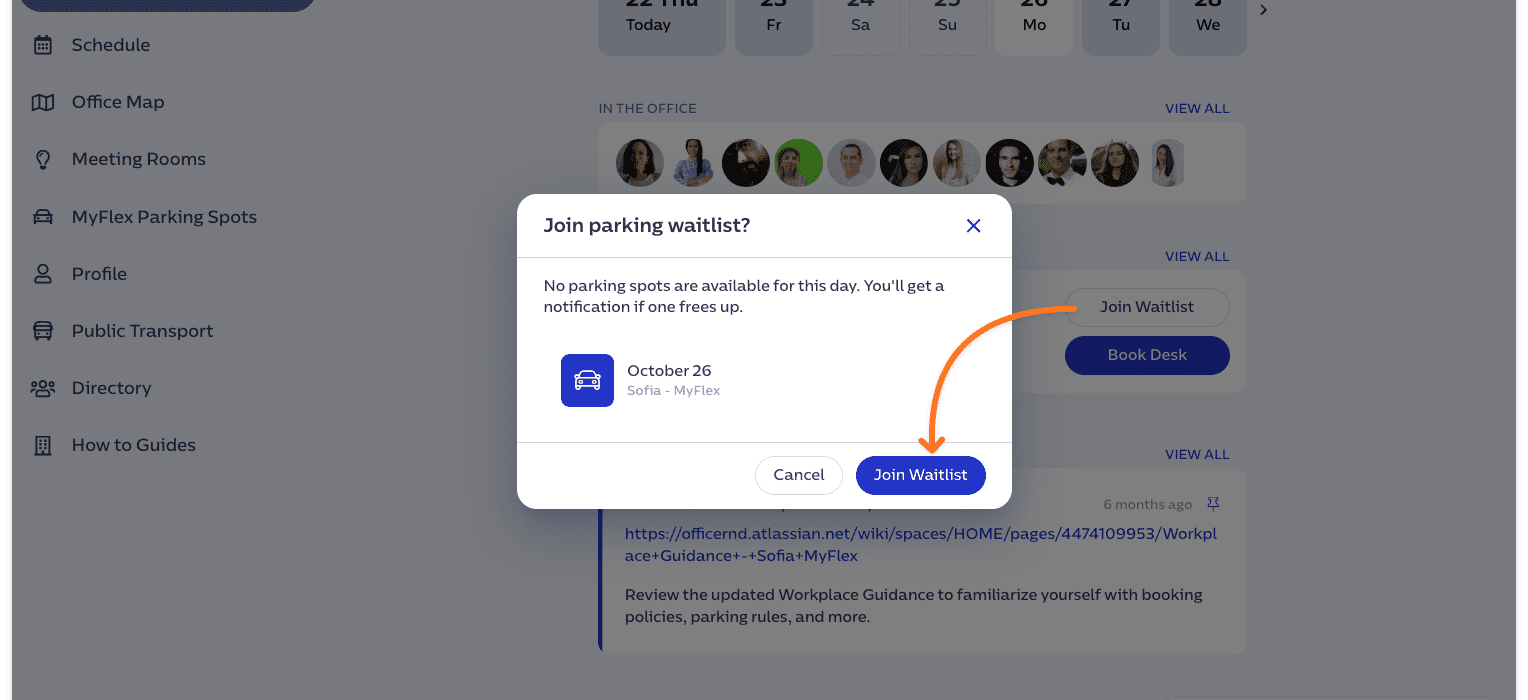
The parking waitlist gives them a third option. When every spot is booked, employees join the waitlist for the period they need. If a spot frees up during that period, say because a colleague cancels, Workplace notifies them.
Employees can join wherever they are:
The waitlist follows how your parking is set up. If spots are booked by the day, people wait for a day. If they’re booked by the hour, people wait for a time range.
One thing to know: the waitlist doesn’t book the spot automatically. It tells employees a spot is free, and they book it in a couple of clicks. That keeps the decision with the person who’s actually driving in, and keeps spots from going to someone whose plans have already changed.
You know the messages. “Can you hold a spot for me Thursday?” “Let me know if anything opens up.” Every one of them ends up in your inbox or on a sticky note. Now the system keeps the queue. Employees join the waitlist themselves and hear about free spots without you in the middle, so you can get back to running the workplace instead of guarding the car park.
See how Chaos replaced a car park where spots went to whoever arrived first with a booking system that gives employees certainty before they commute.
You’ve worked hard to make the office worth the trip. But the experience doesn’t begin at reception. It begins when someone pulls in, and a stressful ten minutes in the car park can undo a lot of good intentions. Booking desk and parking together, and getting a heads-up when a spot opens, makes the first moments of the day calm and predictable.
There’s no new app to deploy and no new tool to learn. Parking lives in the same Workplace product employees already use, on the same office maps, and the waitlist is available in Microsoft Teams. Setup takes a few clicks in the Admin Portal.
If you’re on the Pro plan, you can switch parking on today:
That last step matters. Employees see parking offers and the waitlist only once at least one spot is live on a map.
With desk and parking booked together, and a waitlist for the busy days, drivers walk in on time and in a good mood. Facility teams stop handling parking requests by hand. And the office becomes a little easier to say yes to.
That’s the whole idea: a commute with no surprises, and an office day that starts the way it should.
Already on OfficeRnD Workplace? If you’re on the Pro plan, parking is ready to switch on in your Admin Portal today.
New to OfficeRnD? See how Workplace makes limited parking work for everyone, or book a meeting with our team to see how OfficeRnD Workplace can help you manage your office better.
Does the waitlist book a spot for me? No. It lets you know when a spot is free, and you book it yourself from the Dashboard.
Do I have to book a desk to get parking? No. You can book a parking spot directly from the Dashboard.
What if no spot is free when I book a desk? You won’t see a parking offer. You can join the waitlist for the same time instead.


Compare 6 Skedda alternatives on price, IT fit and G2 reviews.
![14 Best Space Management Software Tested and Compared [2026]](data:image/svg+xml;base64,PHN2ZyB2aWV3Qm94PSIwIDAgMTE1MiA3MTkiIHdpZHRoPSIxMTUyIiBoZWlnaHQ9IjcxOSIgeG1sbnM9Imh0dHA6Ly93d3cudzMub3JnLzIwMDAvc3ZnIj48L3N2Zz4=)
The best space management software in 2026 is OfficeRnD Workplace. This is a complete buyer's guide.
The average flex operator connects 1.65 of 5 core systems. See what the gap costs and how to fix it.
A 2-site coworking operator shares how OfficeRnD's AI Sales Agent handles inquiries.
A full year of hybrid work data, taken from our own Workplace product analytics.
OfficeRnD Flex vs Nexudus on pricing, features, and real G2 reviews.