Introducing Bulk Bookings: The First Of Its Kind Resource Booking Powerhouse

4 mins read Published: Jul 17, 2024 Last updated: Jul 31, 2026
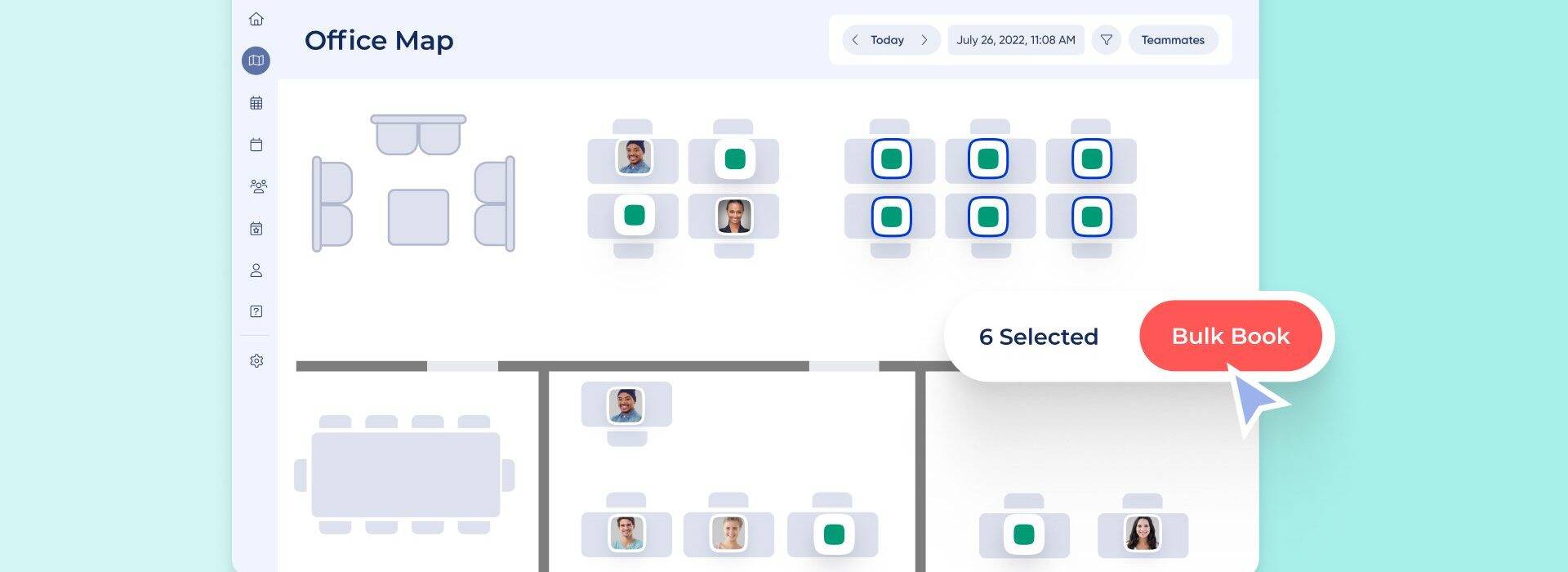
Bulk Bookings is a feature in OfficeRnD Workplace that lets admins and team leads reserve multiple desks and spaces for a group of people in one action, straight from the office map.

If you manage seating for a team, you know the old way: open a resource, pick a desk, assign a person, repeat. Bulk Bookings replaces that with a single click-and-drag on the floor plan. Here’s what it does and how to use it.
Bulk Bookings is part of OfficeRnD Workplace. It reserves several bookable resources, such as desks and spaces, at the same time for a set of employees or an entire team.

Say your sales team is coming in on Tuesday and you want them sitting together. Instead of booking each desk one at a time, you select a block of desks on the map, add the team, and confirm. Everyone gets a desk near their colleagues, and each person receives an email invite.
You can book desks for a group in a few clicks, which saves the repetitive admin work of assigning seats individually and cuts the chance of double bookings.
This came from direct requests by the people who run day-to-day resource management: admins, office managers, and team leads booking on behalf of colleagues.
Coordinating dozens of separate bookings by hand took time and led to mistakes. Bulk Bookings handles the whole group in one pass, so a team day out or an all-hands seating plan takes minutes instead of an afternoon.

A Workplace admin enables the feature first, under Settings > Organization > Booking Permissions by turning on Allow Bulk Bookings. By default you can book 15 resources at once. You can set that limit anywhere from 2 to a maximum of 25.
Once it’s on, here’s the flow:
A few things worth knowing. Meeting rooms and assigned resources can’t be booked in bulk; all other bookable resources, including desks and spaces, can. Each attendee is matched to one of the selected resources. If you pick more resources than people, the extras are left free. And if any booking fails, the system tells you how many went through, how many didn’t, why, and which users couldn’t be booked.
How many desks can I book at once with Bulk Bookings?
The default is 15 resources per bulk booking. A Workplace admin can change that limit to anywhere between 2 and 25 in Settings > Organization > Booking Permissions.
Can I book meeting rooms in bulk?
No. Meeting rooms and assigned resources aren’t eligible for Bulk Bookings. Desks and other bookable spaces are.
Does Bulk Bookings support recurring bookings?
No. Bulk Bookings applies to a specific date and doesn’t support recurrences. For repeating reservations, use the separate recurring bookings feature in OfficeRnD Workplace.
Which plans include Bulk Bookings?
Bulk Bookings is available on the Pro and Enterprise plans.
What happens if someone in the group is already booked or out of office?
You’re notified before you confirm. If a booking still fails, the system reports how many went through, how many didn’t, the reason, and the names of anyone who couldn’t be booked.
Open your OfficeRnD Workplace portal to get started. If the button isn’t there yet, ask your Workplace admin to enable it under Booking Permissions.
You can also watch a short walkthrough by clicking here.


![14 Best Space Management Software Tested and Compared [2026]](data:image/svg+xml;base64,PHN2ZyB2aWV3Qm94PSIwIDAgMTE1MiA3MTkiIHdpZHRoPSIxMTUyIiBoZWlnaHQ9IjcxOSIgeG1sbnM9Imh0dHA6Ly93d3cudzMub3JnLzIwMDAvc3ZnIj48L3N2Zz4=)
The best space management software in 2026 is OfficeRnD Workplace. This is a complete buyer's guide.

The average flex operator connects 1.65 of 5 core systems. See what the gap costs and how to fix it.
A 2-site coworking operator shares how OfficeRnD's AI Sales Agent handles inquiries.
A full year of hybrid work data, taken from our own Workplace product analytics.
OfficeRnD Flex vs Nexudus on pricing, features, and real G2 reviews.
OfficeRnD Workplace vs Robin, full comparison: pricing, adoption, coordination and fit