At OfficeRnD, we keep improving the way your team works in the office. Meeting Services is one of those improvements, and it changes how people request what they need for a meeting.
Meeting Services in OfficeRnD Workplace lets employees request catering, equipment, and room setup as part of a room booking, and lets admins manage every request from one place.
Whenever people gather in person, the setup should be worth the trip. That means the right space, the right room setup and equipment, and the extras that make a meeting run well, all requested and managed in the same flow as the booking.
Why meeting services matter for hybrid work
The way teams run meetings has changed, so we kept building on our meeting room booking system.
Along the way we improved check-ins, booking management, and booking approvals, all aimed at making the meeting room experience smoother for admins and employees.
Meeting Services builds on that work. The goal is simple: give people an easy way to ask for what a meeting needs, and give admins a clear way to deliver it.
What are meeting room service requests?
Meeting Room Service Requests add a services layer to room booking.
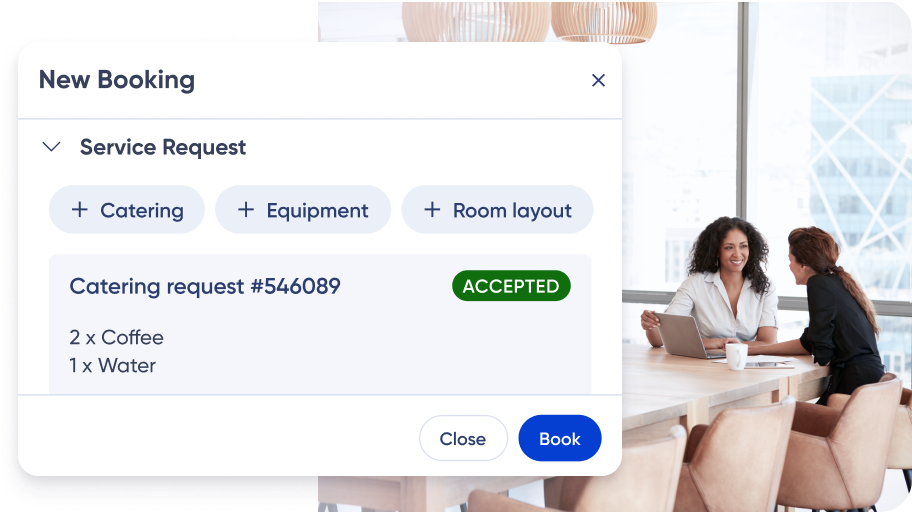
The feature works with our existing meeting room booking system, so users can request additional services such as catering, custom equipment setups, room layout changes, and more, all from the same booking flow they already use. Service requests fit any type of booking. They’re most useful for meeting rooms, but they also work for desks.
It’s easy for both users and admins.
Key features and benefits
For users
- Set up the meeting your way. Adjust the room to fit what the meeting needs, directly in the booking process. Available on the Web Portal and through MS Teams.
- Save time. Quick service requests keep your attention on the agenda, not the logistics.
- Stay in the loop. Work with admins on the details and keep a record of every request and change. In-product and email notifications confirm each request.
For admins
- Manage everything in one place. Handle all meeting room bookings and services from a single view, with full visibility.
- Keep control of resources. Spend less time reorganizing spaces and more time on the work, with every request recorded and structured.
- Cut waste. Track service usage and control spending on catering, equipment, and setup.
- Configure it to fit. Set request categories, notification rules, and user request forms to match how your organization works.
Why we built meeting services
Different meetings need different setups. A casual team catch-up and a client presentation don’t call for the same room, equipment, or catering.
Meeting Services fits the space to the meeting, whatever the occasion.
The feature is part of the Workplace Services capabilities in OfficeRnD Workplace, built to be straightforward for both users and admins.
A practical tool for hybrid workplaces
Meeting Room Service Requests give employees a direct way to customize their meeting environment.
For admins, it adds control and a clearer process for managing meeting spaces and services.
Users decide what a meeting needs. Admins see the request, assign it, and track it to completion. Both sides work from the same record.
How does it work for admins?
Admins set up service categories under Settings, then Workplace Services, then the Meeting Services tab. Each category can carry up to 5 configurable fields, such as delivery time or an item list with quantities.
You choose which locations and resource types offer each service, and who gets notified. One person can handle catering requests in London while another handles New York.
Requests come in under Communication, then Workplace Services in the admin portal. Each category has its own tab, and a badge shows how many requests need action. Filter by status, booking date, assignee, priority, or requester, then assign and update each one.
Get started with meeting services
Every meeting has a better chance of being useful when the space is set up for it.
Meeting Services in OfficeRnD Workplace helps you do that, whether you want smoother collaboration, less admin work, or meetings that simply run better.
Book a live demo with OfficeRnD Workplace and talk with one of our workplace experts.
FAQ
What is meeting services in OfficeRnD Workplace?
It’s a feature that lets employees request extras for a meeting room booking, such as catering, A/V equipment, and room setup, and lets admins receive, assign, and track those requests in one place.
Can users add service requests to any booking?
Service requests can be added to any type of booking. They’re most applicable to meeting rooms, but they also work for desks.
Where can users submit a service request?
Users request services from the New Booking modal in the Web Portal, and through MS Teams. They can see their requests, check statuses, and add comments from the Service Requests page in their profile.
Which plans include meeting services?
Meeting Services is available on the Professional and Enterprise plans. Note that it isn’t available for recurring bookings.
How do admins manage service requests?
Admins review and manage requests under Communication, then Workplace Services in the admin portal. Each service category has its own tab, and requests can be filtered, assigned, and updated by status.






![The Hybrid Work Trends That Will Shape 2027 [Webinar]](https://www.officernd.com/wp-content/uploads/2026/11/The-Hybrid-Work-Trends-2027-1-336x150.png)


![14 Best Space Management Software Tested and Compared [2026]](https://www.officernd.com/wp-content/uploads/2022/07/Manage-Shared-Seating.png)