Month-end at a multi-location coworking brand often feels like déjà vu.
Slack pings nonstop. Every location has its own spreadsheet. Finance is waiting on “latest numbers” while leadership is already asking, “So how did we do this month?”
Meanwhile, the industry is growing fast. Some reports project the global coworking market to roughly double in size by 2030, with operators investing heavily in tech to keep up.
If your billing is slow or inaccurate, you’re not just dealing with admin pain, you’re putting cash flow and growth at risk.
This article gives you a practical, repeatable month-end billing runbook designed for multi-location coworking operators. You can run it today and gradually automate it with tools like OfficeRnD Flex, Stripe, and your accounting system.
Why Month-End Explodes in Complexity When You Add Locations
Once you go beyond a single location, everything multiplies:
- Multiple legal entities and bank accounts
- Different tax rules across regions or countries
- Different product mixes and prices per site
At the same time, your revenue blends recurring (offices, desks, virtual memberships) with variable (meeting rooms, passes, events). Each has its own billing rules, discounts, and edge cases.
Manual invoice processing is not built for this. Studies show manual invoice data entry error rates around 1–3%, and fixing each error can be surprisingly expensive in both time and money.
Scattered Workflows Across Teams and Tools
For many operators, data lives everywhere:
- Community teams log changes in Slack or local sheets
- Bookings sit in a separate calendar or booking tool
- Invoices and accounting are in Xero or QuickBooks
Every handoff is a chance for data to be delayed or distorted. Research across industries links manual invoice workflows to higher error rates, slower processing, and worse visibility into cash flow.
See the
most common mistakes coworking operators make that stop them from scaling properly.
The “Hero Operator” Problem
Most multi-site brands have a “billing hero” at each region or flagship site—the person who just “knows how it works.”
That’s not a system.
If that person is off or leaves, billing slows down or breaks. You also can’t scale from 3 to 10+ locations if everything depends on individual knowledge instead of a documented, repeatable runbook.
What a “Good” Month-End Close Looks Like
Before changing tools or processes, decide what success looks like.
Clear Targets for Time to Close and Accuracy
Set simple, measurable targets such as:
- Time to close: “All invoices sent within 3 business days of month-end.”
- Accuracy: “Less than 2–3% of invoices require correction.”
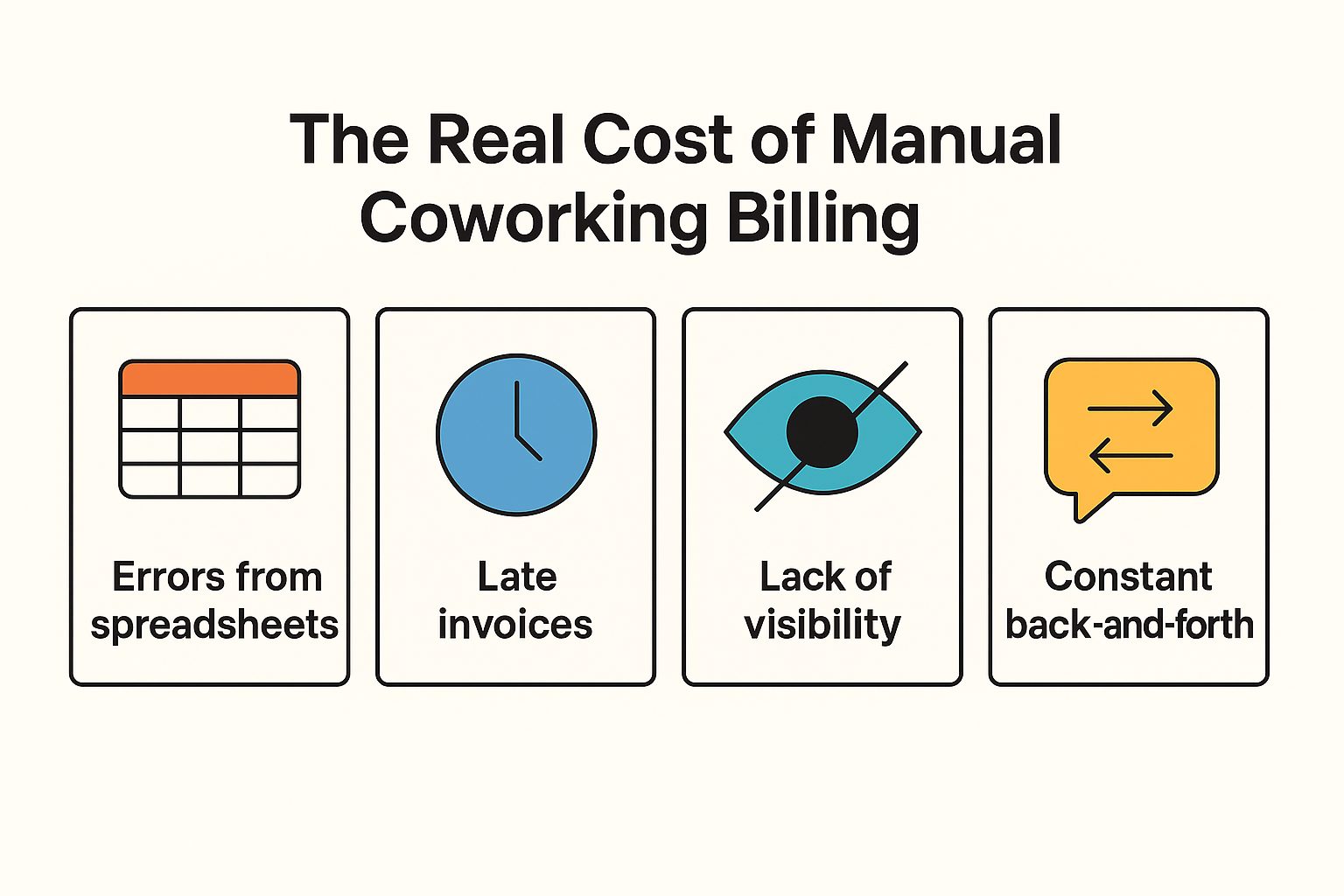
Invoice errors don’t just annoy members; they also delay payments and create extra work for finance.
Predictable Experience for Members and Teams
A good month-end close is predictable:
- Members know when invoices arrive and what they’ll contain
- Local teams follow a checklist instead of scrambling
- Finance gets clean, consistent data into accounting
Clear Ownership: Who Does What, When
Define roles first, tools second:
- Location managers: Keep member and contract data clean; review local drafts
- Central ops: Own product catalog, billing rules, and playbooks
- Finance: Own collections, accounting integrations, and reporting
When everyone understands their part of the runbook, fewer tasks fall through the cracks.
The Step-By-Step Month-End Billing Runbook
You can start by doing these steps manually, then progressively automate them.
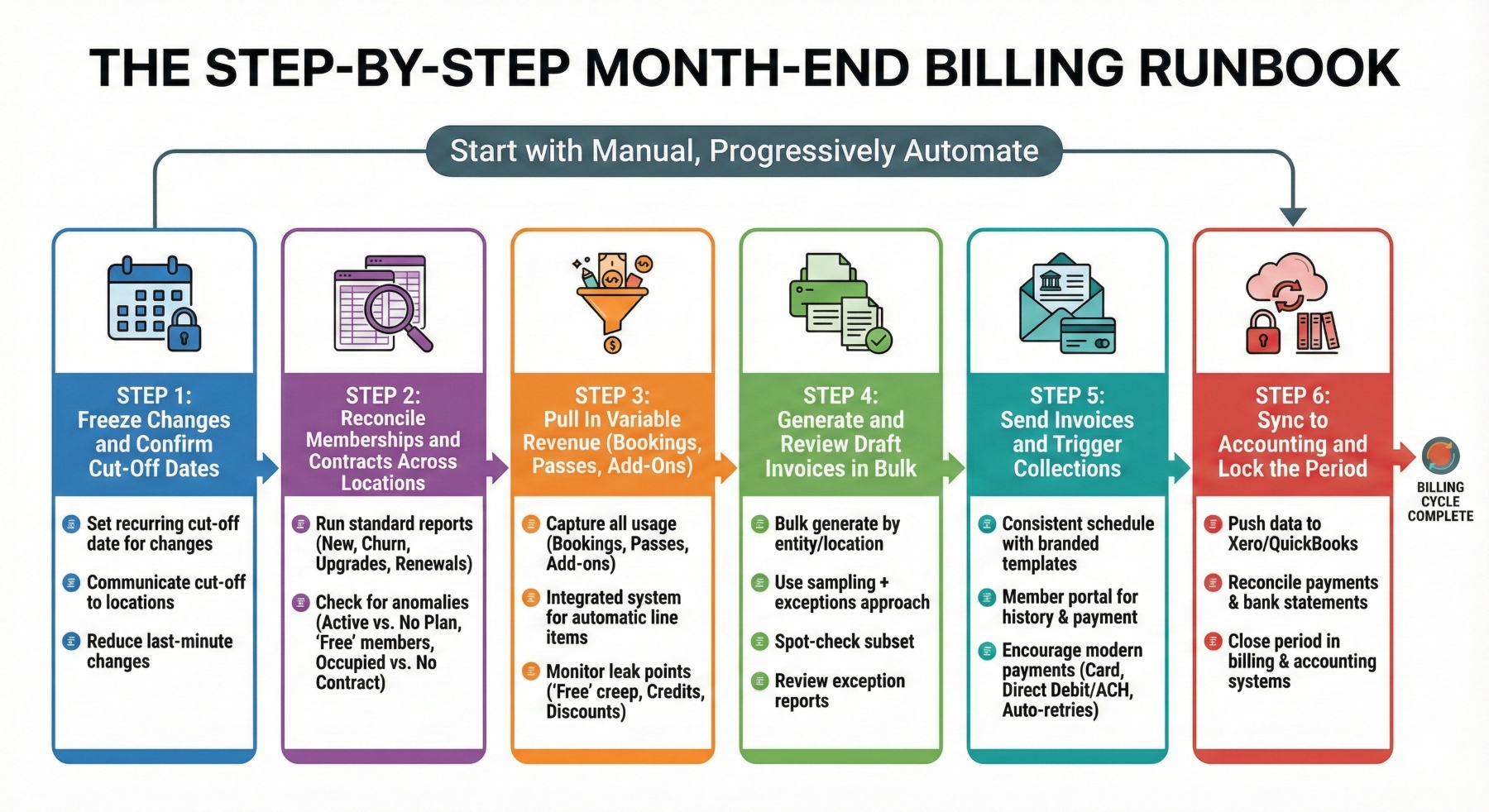
Step 1 – Freeze Changes and Confirm Cut-Off Dates
Decide what belongs to this billing cycle vs. the next:
- Set a recurring cut-off date for contract changes and plan switches
- Communicate the cut-off clearly to each location
- Reduce last-minute changes that force manual invoice edits
Even this alone can dramatically reduce exceptions.
Check out the most
impactful coworking statistics for 2026 here.
Step 2 – Reconcile Memberships and Contracts Across Locations
Run the same standard reports for every site:
- New members
- Cancellations/churn
- Upgrades and downgrades
- Renewals and expiring contracts
Check for anomalies such as:
- Active access, but no active plan
- “Free” members who should be under a paying company
- Offices marked as occupied but not tied to a billed contract
In a
platform like OfficeRnD Flex, member and contract data is centralized, so you’re reconciling one system rather than five.
Step 3 – Pull In Variable Revenue (Bookings, Passes, Add-Ons)
Variable revenue is where many operators leak money.
Make sure you capture all of this before invoices go out:
- Meeting room and event bookings
- Day passes and drop-ins
- Add-ons like lockers, parking, printing, or mail handling
Ideally, bookings and one-off charges should live in the same system that creates invoices, so usage is automatically added as line items.
Common leak points:
- “Free” meeting room hours that creep beyond policy
- Credits not deducted properly
- One-off discounts that quietly become permanent
Step 4 – Generate and Review Draft Invoices in Bulk
Next, generate draft invoices in bulk by entity, location, or segment.
Instead of inspecting every invoice, use a sampling + exceptions approach:
- Spot-check a subset per location (new members, large accounts, complex deals)
- Review exception reports: negative totals, zero-value invoices, unusual discount levels, missing tax
You keep strong control without turning month-end into a line-by-line audit.
Step 5 – Send Invoices and Trigger Collections
Send invoices on a consistent schedule using:
- Branded email templates
- Clear line items and tax breakdowns
- A member portal where customers can see invoice history and pay online
Late payments are a real threat to SMEs. One recent study found 44% of invoices were paid late, tying up billions in working capital and hurting small business cash flow.
Encourage modern payment methods that speed up cash collection:
- Card payments
- Direct debit or ACH
- Automated retries on failed payments
With the
OfficeRnD + Stripe integration, you can automatically charge invoices for memberships, bookings, and services via credit cards, SEPA, ACH, and other methods. Successful charges are pushed back into OfficeRnD and, if connected, into your accounting system—keeping your collected vs. overdue revenue up to date.
Are you operating in Europe? Then learn more about VIDA and e-invoicing.
Step 6 – Sync to Accounting and Lock the Period
Finally, push your billing data into accounting:
- Sync invoices, payments, and credits into Xero or QuickBooks Online
- Reconcile payments and bank statements
- Close the period in both your billing and accounting systems
OfficeRnD Flex automates much of this flow, sending invoices from Flex to tools like QuickBooks and Xero, and linking successful charges made via Stripe back to the right invoices in both systems.
Want these six steps to feel like a one-click bill run?
Book a live demo with OfficeRnD Flex and see how multi-location operators do it.
Designing a Billing Architecture That Actually Scales
The runbook is easier to run when your billing architecture is solid.
Standardized Product Catalog with Location-Aware Pricing
Define your products centrally, then allow for local nuance:
- Use consistent naming across locations (e.g., “Dedicated Desk,” “Private Office – Large”)
- Apply location-specific pricing and tax rules where needed
- Map each product to the right revenue account
This gives you comparable reporting across sites while still reflecting local market realities.
Handling Multiple Entities, Taxes, and Currencies
If you operate across countries or entities:
- Assign each location to an entity and tax profile
- Standardize how deposits, prepayments, and refunds are handled
- Bake tax logic and account mappings into your system instead of someone’s memory
Contract Logic: Proration, Deposits, and Term Changes
Decide once and apply everywhere:
- When do you prorate vs. bill full month?
- How do you charge, hold, and refund deposits?
- How do mid-month upgrades and downgrades show up on invoices?
Configured properly in your coworking management platform, contract changes flow automatically into billing and access control.
Governance, QA, and Controls: Protecting Revenue at Scale
Monthly Billing QA Checklist
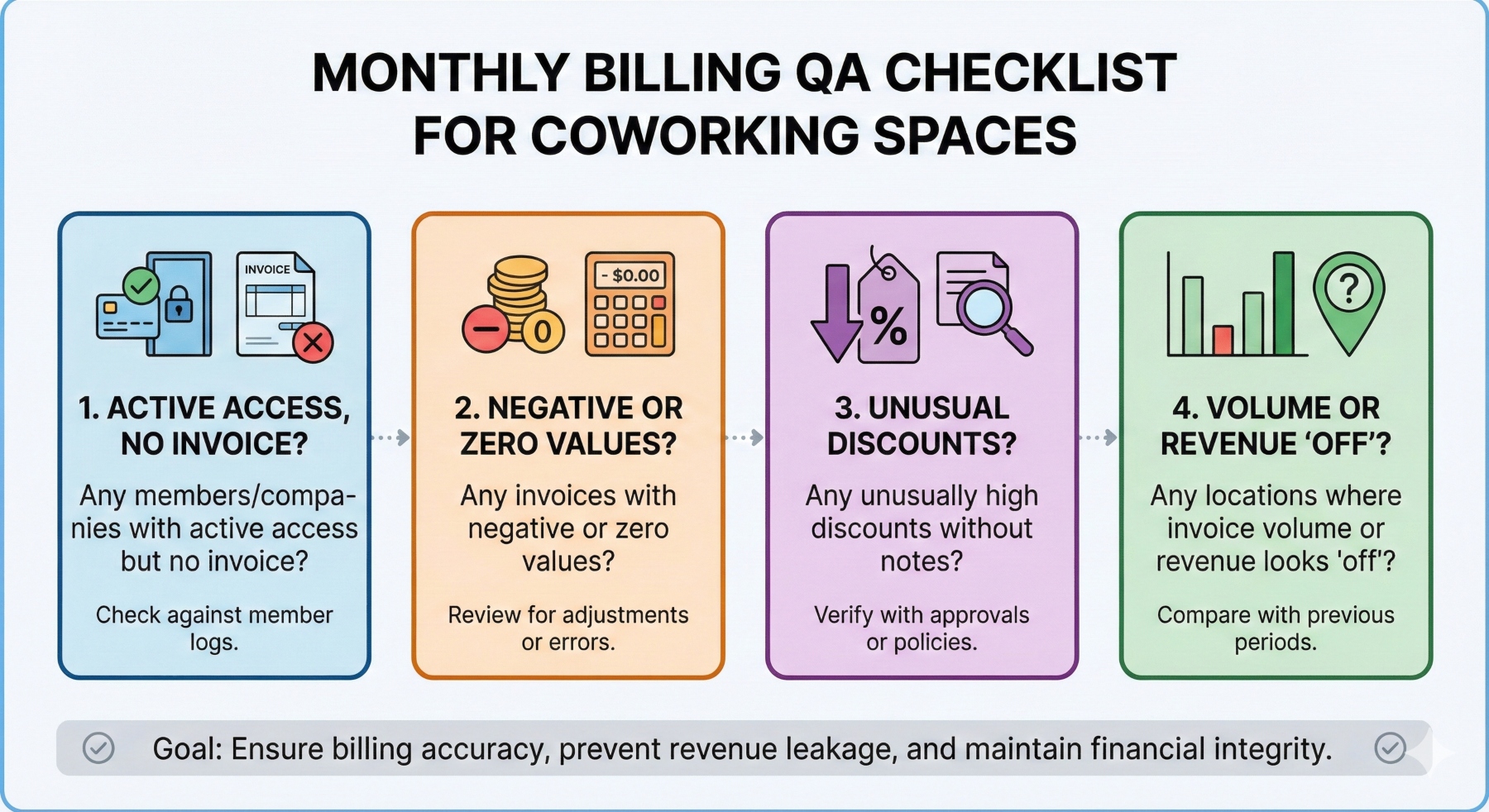
Create a simple monthly checklist for finance or central ops:
- Any members/companies with active access but no invoice?
- Any invoices with negative or zero values?
- Any unusually high discounts without notes?
- Any locations where invoice volume or revenue looks “off”?
Saved views and exception reports can help you run this QA quickly.
Spotting and Plugging Revenue Leakage
Revenue leakage is often invisible until you look for it:
- Complimentary meeting hours that keep stretching
- Legacy discounts that never expire
- Add-ons that are delivered but not billed
Studies on manual invoice processing show that even small error rates create meaningful financial leakage and extra admin work, especially at scale.
Documenting the Runbook So New Locations Can Plug In
Turn your month-end flow into a documented asset:
- Convert the steps into a one-pager or internal wiki
- Add screenshots from your billing platform
- Include it in onboarding for new location managers and finance hires
Every new location should plug into the same runbook instead of reinventing billing from scratch.
Turning Billing Data into a Multi-Location Performance Dashboard
Core Billing KPIs by Location
Use billing data to track health at each site:
- Monthly recurring vs. one-off revenue
- Overdue balances and aging buckets
- Average days to collect payment
- Discounts and write-offs as a % of revenue
Late payments are one of the biggest drivers of SME cash flow problems, and in some markets nearly two-thirds of invoices are paid late. These KPIs help you see risk early.
Comparing Locations with a Standard Dashboard
If every site has its own reporting format, it’s hard to see patterns.
Instead, build one standard dashboard template and reuse it:
- Same KPIs
- Same filters
- Same definitions
Then compare locations and ask better questions: Why does Location A consistently collect faster? Why does Location C give more discounts?
Using Billing Insights to Shape Strategy
Over time, billing data should guide big decisions:
- Which products are most profitable across the network?
- Where are you consistently underpricing or over-discounting?
- Which locations are ready to expand—and which need a reset?
Billing stops being “admin” and becomes a strategic signal.
Want to learn what’s next for flex? Here are the 13 most anticipated
coworking and flex space trends for 2026.
Rolling This Runbook Out Across Your Network
Start with 1–2 Pilot Locations
Don’t roll everything out at once.
- Choose 1–2 locations that reflect your “typical” complexity
- Run the new process for 2–3 cycles
- Gather feedback and refine your checklists and templates
Once you’re confident, roll it out region by region.
Train Local Teams with Simple Playbooks
Support teams with:
- Short video walk-throughs of each step
- Month-end checklists per role
- FAQs for the most common invoice questions
Make billing hygiene part of how you measure and coach local leaders.
Communicating Changes to Members
If the new process changes invoice dates, formats, or payment options:
- Email members explaining what’s changing and why
- Update billing FAQs in your member portal or app
- Equip front-of-house teams with simple talking points
This reduces friction and billing-related support tickets when the new process goes live.
Where OfficeRnD Flex and Stripe Fit in Your Month-End Runbook
You can run this playbook with almost any toolset, but a dedicated coworking platform plus a modern payment gateway makes it much easier, especially at a multi-location scale.
OfficeRnD Flex is built for coworking and flex operators and helps you:
- Centralize member, contract, and product data across locations
- Standardize your catalog while allowing for location-specific pricing
- Automate recurring invoices from memberships and bookings
- Run bulk invoice batches and send branded invoices in a few clicks
- Sync data to leading accounting tools like Xero and QuickBooks
The OfficeRnD + Stripe integration then takes care of collecting payments:
- Automatically charge invoices for memberships, bookings, and services
- Accept credit and debit cards, SEPA direct debit, ACH, and additional payment methods with Stripe 2.0
- Reflect successful charges in OfficeRnD immediately and, if connected, in your accounting system
- Support multi-location and multi-currency setups across your portfolio
- Offer in-person card payments via Stripe Terminal in supported regions, tied directly to OfficeRnD invoices
Real-world operators are already seeing the impact. For example, Workbar used OfficeRnD + Stripe to automate invoicing and payment tracking, cutting manual work and reducing late payments across memberships, meeting rooms, and events.
When you combine a clear month-end runbook with tools like OfficeRnD Flex and Stripe, month-end can shift from a recurring fire drill to a predictable, repeatable process that supports rapid multi-location growth.
Ready to turn month-end from a scramble into a simple checklist?
Book a live demo with OfficeRnD Flex and see how leading multi-location coworking operators streamline billing, payments with Stripe, and close their books in hours, not days.




![The Hybrid Work Trends That Will Shape 2027 [Webinar]](https://www.officernd.com/wp-content/uploads/2026/11/The-Hybrid-Work-Trends-2027-1-336x150.png)


![14 Best Space Management Software Tested and Compared [2026]](https://www.officernd.com/wp-content/uploads/2022/07/Manage-Shared-Seating.png)