Choosing university scheduling software gets complicated fast because universities schedule more than classes.
A campus may need to manage faculty offices, shared desks, meeting rooms, study rooms, labs, guest lecturers, visiting researchers, contractors, department-owned spaces, and hybrid staff schedules. Each group has different needs. Each space has different rules.
The buying process should start with a simple question: Which scheduling problem are you trying to solve?
University scheduling software can mean academic timetabling, room booking, event scheduling or campus workplace scheduling. This guide focuses on software for managing physical campus spaces, shared resources, visitors, and hybrid faculty or staff schedules.
That scope matters. Higher education teams are under pressure to make better use of existing space. Gordian’s 2025 State of Facilities in Higher Education report says conversations about space utilization continue across campuses and notes that hybrid or remote office practices are still affecting office occupancy patterns.
Quick summary: University scheduling software can mean several things, so start by defining the use case. Some tools manage academic timetables and exams. Others manage rooms, desks, visitors, shared resources and hybrid staff schedules. For campus workplace scheduling, look for software that supports:
Room booking for meeting rooms, seminar rooms, study spaces and department spaces
Desk booking for faculty, staff, visiting researchers and admin teams
Permissions by department, role, building or space type
Calendar connections with Microsoft 365 or Google Workspace
SSO through systems like Azure AD, Okta or Google
Visitor management for guest lecturers, contractors and external guests
Reporting on room usage, desk usage, no-shows, peak demand and department activity
The best choice depends on who needs to book space, which spaces need rules or approvals and what data facilities, IT, HR and campus leadership need after rollout.
At the same time, budgets are tight. NACUBO’s 2025 State of Higher Education research lists unreliable funding, workforce pressure and rising operating costs among the top business issues facing higher education business officers.
Scheduling software will not fix those issues by itself. It can give facilities, IT, HR and campus operations teams better control over how spaces are booked, used, and reported.
The phrase has mixed search intent. Some people use it to mean course timetabling. Others use it to mean room scheduling, desk booking or space management.
That difference matters when you compare vendors.
The four main types of university scheduling software
Academic timetabling software
Academic timetabling software is used for course schedules, exams, instructors and classroom assignments.
It is usually owned by registrar teams, academic operations or scheduling offices.
Room booking software
Room booking software is used for meeting rooms, seminar rooms, conference rooms, study rooms and department-owned spaces.
It is usually used by facilities teams, faculty, staff, students, and administrative departments.
Event scheduling software
Event scheduling software is used for guest lectures, student events, ceremonies, conferences and large room requests. It often includes request forms, approvals, event services, and coordination across multiple teams.
Workplace scheduling software for universities
Workplace scheduling software is used for desk booking, hybrid staff schedules, shared workspaces, room reservations, visitor management and campus space usage.
It is usually relevant for facilities, HR, IT, workplace teams, and administrative departments.
Start by narrowing the category
A university may need more than one scheduling system. Academic timetabling, event scheduling and workplace scheduling often overlap in conversation, but they solve different problems.
Before comparing vendors, define the job the software needs to handle.
If you need to…
Look for…
Build semester timetables
Academic timetabling software
Schedule exams and instructors
Academic timetabling software
Book meeting rooms, seminar rooms or study rooms
Room booking software
Manage shared desks for faculty and staff
Workplace scheduling software
Coordinate hybrid office days
Workplace scheduling software
Manage guest lecturers, contractors or visiting researchers
Visitor management software
Track how campus spaces are used
Workplace or space management software
Manage large campus events
Event scheduling software
Many universities will need several of these capabilities. The key is to avoid choosing a system built for course scheduling when the real need is space booking, visitor check-in or hybrid staff coordination.
Start with the problems your university needs to solve
Before reviewing vendors, list the problems your current process creates.
Common examples include:
Rooms appear available in one calendar and booked in another
Faculty request space through email threads
Staff arrive on campus without knowing where to sit
Departments manage rooms in separate spreadsheets
Labs or specialist rooms need approval before booking
Visiting lecturers and contractors need manual check-in
Facilities teams lack clear space usage data
IT supports several disconnected booking tools
Students, staff and faculty need different access rules
These problems should shape your requirements. A generic booking tool may work for a small department. A university-wide system needs more control.
Ask these questions first:
Who needs to book space?
Which spaces need reservations?
Which spaces need approval?
Which spaces should be restricted by department or role?
Do users need mobile booking?
Do users need floor plans?
Should bookings sync with Microsoft 365 or Google Workspace?
Do users need single sign-on?
Do visitors need digital check-in?
Do facilities teams need usage reports?
Do departments need control over their own spaces?
Define the spaces and resources the software must support
University scheduling gets messy when teams only document the obvious rooms.
A better requirements list includes every space and resource people need to reserve.
Rooms
Include:
Meeting rooms
Seminar rooms
Lecture rooms
Study rooms
Interview rooms
Conference rooms
Department rooms
For each room, the software should show availability, capacity, location, equipment, booking rules and approval requirements.
Desks and shared workspaces
Desk booking matters when faculty, staff and visiting researchers split time across campus, home and other university locations.
Common use cases include:
Faculty hot desks
Staff desks
Visiting researcher desks
Administrative workspaces
Hybrid department areas
Shared offices across buildings
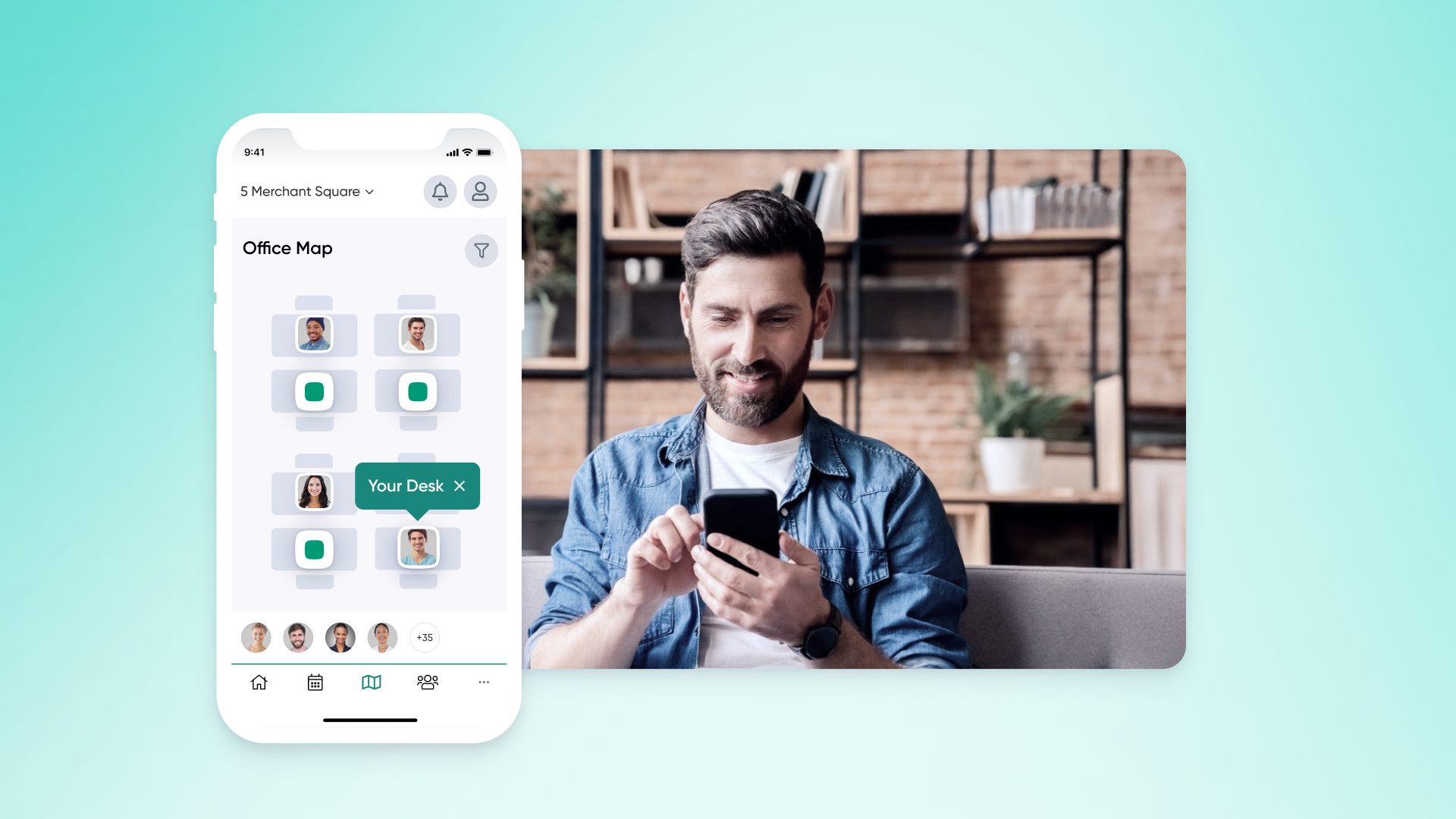
The system should make it easy to find a suitable desk, see where colleagues plan to work and book near a department or team when needed.
Labs and special-purpose spaces
Labs and specialist rooms often need stricter rules than normal meeting rooms.
Check whether the software can support:
Restricted access
Approval flows
Booking limits
Space-specific instructions
Department ownership
Visibility for central admins
This is especially relevant for research pods, recording rooms, specialist teaching spaces and equipment rooms.
Shared resources
Universities often need to book a space and a resource together.
Examples include:
AV equipment
Projectors
Whiteboards
Lockers
Parking spaces
Research equipment
Recording equipment
Check whether resources can be tied to specific rooms, buildings or user groups.
Visitors
Visitor workflows should be part of the review when bookings involve people from outside the institution.
Common visitor types include:
Guest lecturers
Contractors
Visiting researchers
Parents
External partners
Interview candidates
Donors
A room booking may need a visitor record, host notification and check-in process. If those steps happen outside the scheduling system, reception and security teams may still rely on manual work.
Check whether the software can handle university-level permissions
Permissions are one of the biggest differences between simple booking tools and university-ready scheduling software.
A space may be visible to one group, bookable by another and restricted for students during certain hours. A lab may need approval from a department owner. A shared meeting room may need rules for booking length, recurring use or access by external guests.
Look for support for:
Department-based access
Role-based access
Faculty-only spaces
Student-accessible spaces
Staff-only areas
Visitor access
Location-based rules
Booking windows
Maximum booking duration
Recurring booking rules
Approval requirements
Admin overrides
Good vendor questions include:
Can departments manage their own spaces?
Can central admins see all bookings?
Can some spaces require approval?
Can rules vary by role, department, space type or campus?
Can admins set booking limits?
Can the system prevent double bookings?
Can it handle multiple buildings or campuses?
Can permissions change when someone changes role?
Review the booking experience
The system may satisfy every admin requirement and still fail if people avoid using it. We write about adoption more extensively in our best desk booking platforms for 2026 guide.
The booking flow should let users:
Search by building or floor
Filter by room type
Filter by capacity
Filter by equipment
See real-time availability
Book from desktop or mobile
Edit or cancel bookings
Find spaces near colleagues or departments
Floor plans are useful across large campuses because room names are often unclear to new staff, visiting faculty or external guests. A floor plan lets people choose a space based on building, floor and location rather than guessing from a room code.
For hybrid teams, visibility also matters. Faculty and staff may need to see who plans to be on campus, book near colleagues or coordinate department days. This can support office hours, mentorship, admin meetings and team planning.
Check calendar, identity and communication connections
University scheduling software should fit into tools people already use.
Calendar connections
Review support for:
Microsoft 365
Google Workspace
Outlook Calendar
Google Calendar
Ask:
Do room bookings sync with user calendars?
Does availability update in real time?
Can users book in the scheduling tool and still see the event in their calendar?
Are cancellations reflected across systems?
Can recurring bookings sync correctly?
Single sign-on
IT should review identity requirements early.
Check for support for:
Azure AD
Okta
Google SSO
Single sign-on reduces separate accounts and gives IT more control over access. It also makes offboarding easier when access follows existing identity rules.
Notifications
Booking reminders and alerts can reduce confusion.
Look for:
Email reminders
Slack notifications
Microsoft Teams notifications
Host alerts for visitors
Booking confirmations
Cancellation updates
Evaluate reporting and campus space usage data
Reporting is where scheduling software becomes useful beyond day-to-day bookings.
Facilities teams may need to understand which rooms are overbooked, which desks sit unused, which buildings see peak demand and where space rules need to change.
Useful reports may include:
Bookings by room type
Desk bookings by building
Peak days and times
No-shows
Cancellations
Low-use spaces
High-demand spaces
Department-level demand
Visitor volume
Room size mismatch
Recurring booking patterns
Different teams will use this data differently.
Facilities teams can see which rooms, desks, and buildings are used most often. IT can review adoption, support needs, and integration issues.
HR can compare hybrid work policies with actual office patterns. Academic operations can understand how department spaces are used outside formal timetables.
Leadership can use space usage data when reviewing renovations, campus workplace plans, and real estate costs.
Ask vendors:
Can we report by building, floor, room type, and department?
Can we see no-shows?
Can we track desk and room usage separately?
Can we export reports?
Can department admins view their own data?
Can leaders see summary views?
Include visitor management in the review
Many campus bookings involve external guests.
A guest lecturer may need access to a seminar room. A contractor may need to check in at reception before reaching a building. A visiting researcher may need temporary access to a desk, lab or department area.
This is especially relevant when reception, security, facilities and academic departments all touch the visitor process.
Plan for rollout and administration
A university scheduling system needs careful setup.
Typical setup includes:
Buildings
Floors
Spaces
Departments
User groups
Booking rules
Calendar connections
SSO
Admin roles
Visitor flows
Reporting views
Decide who owns the system before launch. Ownership may sit with a central facilities team, IT, a workplace team or a shared group across facilities, HR and IT.
A focused rollout is usually easier to manage. Start with one campus, building or department. Define the spaces and rules. Set up calendar and identity connections. Train admins first. Share simple booking instructions with users. Review adoption after 30 to 60 days before expanding.
Ask vendors:
How long does implementation usually take?
Who creates and edits spaces?
Can departments manage their own spaces?
Can central admins override rules?
What training is included?
What support is available after launch?
Can the system expand across multiple campuses?
Use this checklist when comparing vendors
Evaluation area
What to check
Space types
Rooms, desks, labs, study spaces, parking and shared resources
User groups
Faculty, staff, students, visitors and contractors
Permissions
Department rules, approvals, role-based access and admin overrides
Booking experience
Desktop, mobile, floor plans, filters and real-time availability
Calendar connections
Microsoft 365, Google Workspace, Outlook and Google Calendar
Identity
SSO through Azure AD, Okta or Google
Notifications
Email, Slack, Microsoft Teams and host alerts
Visitor management
Pre-registration, check-in, visitor logs and host notifications
Reporting
Utilization, no-shows, peak demand and department usage
Administration
Multi-campus setup, delegated admins and booking policies
Support
Onboarding, training, documentation and admin support
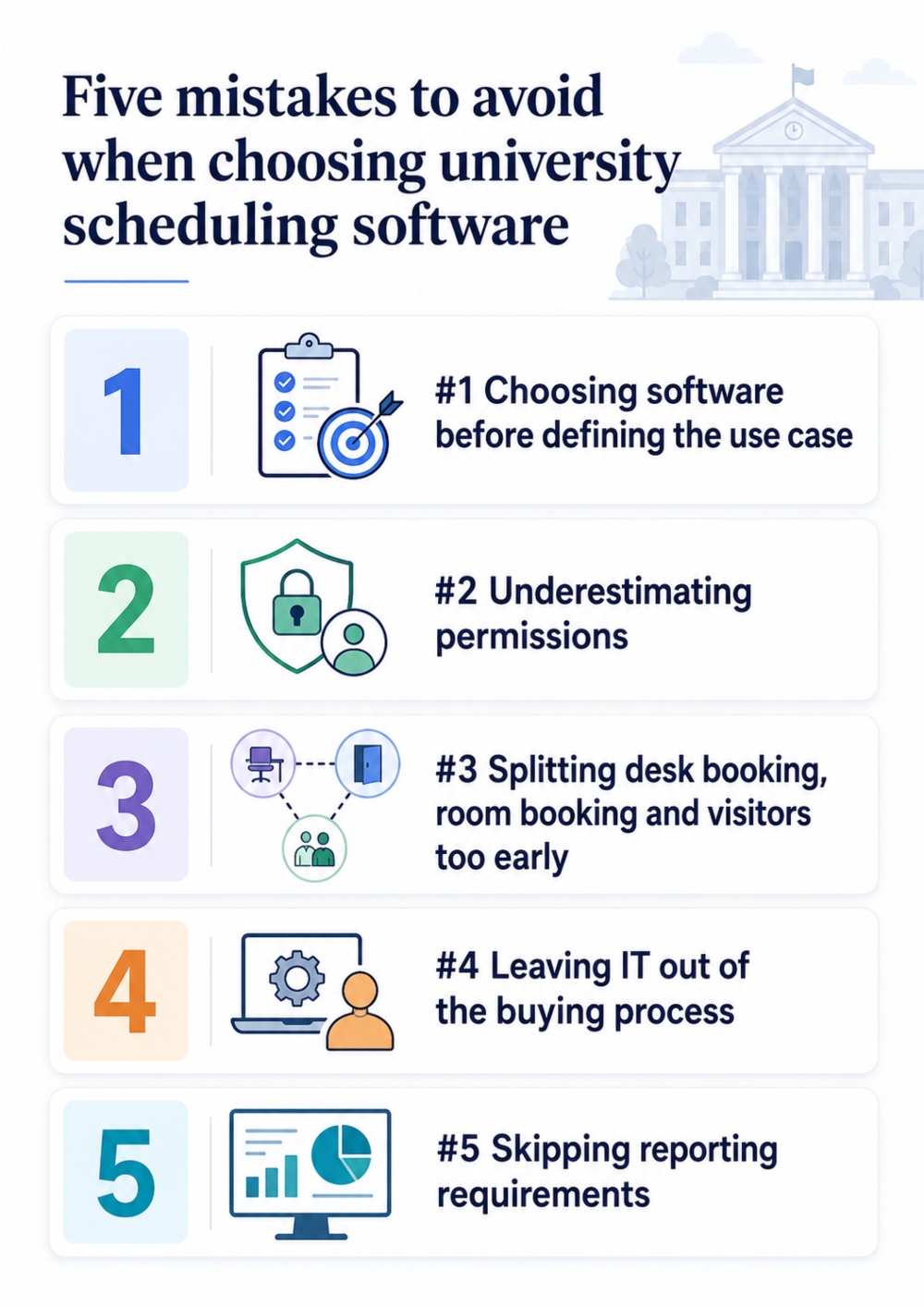
Five mistakes to avoid
#1 Choosing software before defining the use case
A registrar team, facilities team and HR team may all say “scheduling” and mean different things. Define the job first.
#2 Underestimating permissions
Basic booking tools often struggle with department rules, role-based access, approval flows, and multi-campus controls.
#3 Splitting desk booking, room booking, and visitors too early
Separate systems can increase admin work and make reporting harder. Review whether one system can cover the main campus workplace use cases.
#4 Leaving IT out of the buying process
IT should review SSO, calendar connections, data handling, user provisioning, and security requirements.
#5 Skipping reporting requirements
Without usage data, teams may still rely on anecdotal feedback when making space decisions.
When OfficeRnD Workplace is worth reviewing
OfficeRnD Workplace is worth reviewing if your university needs to manage desks, rooms, shared resources, visitors and hybrid staff schedules across campus spaces.
It supports desk booking, room reservations, interactive floor plans, visitor management, Microsoft 365 and Google Workspace calendar connections, SSO and booking reminders through Slack or Microsoft Teams.
Final checklist for choosing university scheduling software
Before choosing a vendor, confirm that you can:
Define the scheduling use case
List every space and resource that needs booking
Map user groups, departments and access rules
Check room, desk, lab and visitor use cases
Review Microsoft 365 or Google Workspace calendar connections
Confirm SSO options
Test the booking flow on desktop and mobile
Review floor plan support
Ask for reporting by building, space type and department
Include IT, facilities, HR and academic operations in the review
Start with a focused rollout before expanding across campus
The right university scheduling software should match the way your campus works: many spaces, many teams, many rules and many people who need a clear way to find and book the right space.
Frequently Asked Questions
What types of scheduling does university scheduling software cover?
University scheduling software can cover four main types: academic timetabling for course schedules and classroom assignments, room booking for meeting rooms and study spaces, event scheduling for guest lectures and conferences, and workplace scheduling for desk booking and hybrid staff schedules. Many universities need multiple types of scheduling capabilities.
What spaces and resources can university scheduling software manage?
The software can manage various campus spaces including meeting rooms, study rooms, labs, faculty offices, shared desks, and department-owned spaces. It can also handle shared resources like AV equipment, projectors, parking spaces, and research equipment, along with visitor management for guest lecturers, contractors, and visiting researchers.
How should universities start choosing scheduling software?
Universities should start by identifying which specific scheduling problem they're trying to solve and listing the problems their current process creates. Before comparing vendors, define the job the software needs to handle, document every space and resource that needs reservations, and determine who needs to book what spaces.
What permission features should university scheduling software have?
The software should support department-based access, role-based permissions, faculty-only and student-accessible spaces, approval requirements for certain rooms, booking limits and duration controls, and admin overrides. It should also handle multiple buildings or campuses and allow permissions to change when someone changes roles.
What integrations are important for university scheduling software?
Key integrations include calendar connections with Microsoft 365, Google Workspace, and Outlook Calendar so bookings sync with user calendars. Single sign-on support through Azure AD, Okta, or Google SSO is important for IT control. Notification systems for email, Slack, and Microsoft Teams help reduce confusion about bookings.
Why is reporting important in university scheduling software?
Reporting helps facilities teams understand which spaces are overbooked or unused, supports data-driven decisions about renovations and campus workplace plans, and provides insights into peak demand patterns. Different teams use this data differently - facilities for space optimization, HR for hybrid work analysis, and leadership for real estate cost decisions.
Senior Content Marketing & SEO Specialist | OfficeRnD
Asen is a Senior Content Marketing & SEO Specialist at OfficeRnD with 5+ years in the workplace and flex space management industries. He tests workplace software hands-on and writes independent, in-depth product reviews and buyer's guides for the teams responsible for choosing it.





![The Hybrid Work Trends That Will Shape 2027 [Webinar]](https://www.officernd.com/wp-content/uploads/2026/11/The-Hybrid-Work-Trends-2027-1-336x150.png)

![14 Best Space Management Software Tested and Compared [2026]](https://www.officernd.com/wp-content/uploads/2022/07/Manage-Shared-Seating.png)