The Most Important Pros and Cons of Hot Desking for Companies

9 mins read
Published: Sep 29, 2021
Last updated: Jun 12, 2026

Hot desking is an office setup where employees don’t have assigned desks. Instead, they use whatever workstation is free, either booked in advance or taken on a first-come, first-served basis.
As work stays hybrid, the old setup of one fixed desk per person is changing. Offices fill up to about 80% on their busiest days but average only 53% utilization across the week (CBRE, 2026). That gap between peak and average days is why companies start asking whether everyone needs a permanent desk.

This is the thinking behind hot desking: cut the number of desks and use the space only when people are actually in.
While the practice has its charm for certain groups of workers and is definitely more cost-effective, it may also present challenges for some organizations. For example, reducing desks and shifting to a less personalized space may impact company culture and disrupt employees’ routines. It may also challenge companies with more rigid hierarchical structures and require them to reevaluate their organization.
For that reason, prior to adopting a hot desking policy, HRs and operations managers need to consider its pros and cons. They need to evaluate whether and how they might implement it locally. To help you understand hot desking and consider its usefulness to your organization, we outlined its major advantages and disadvantages.
Want to know if hot desking is right for you? Keep reading!
Hot desking – also known as desk sharing or desk hoteling – is a method of office design and desk allocation in which employees don’t have their personally assigned desks. Instead, the total number of desks is reduced and, depending on the company policy, seats are reserved in advance or are taken up on a first-come, first-serve basis.
The rationale behind this practice is based on the need for companies to adapt to changes in working culture and the increase in employees who work remotely at least part of the time.
Once an organization adopts a more hybrid approach to work, introducing hot desking makes more sense, since all of its employees rarely if ever get together in the office at once.
As with any shift in the operation of a company, hot desking offers a number of advantages and disadvantages. It impacts material costs but it also influences company culture as well as how individuals feel in the workplace. Here are the different pros and cons of hot desking.
Before that, you might want to check our guide on office hoteling policies.

It’s not by chance that hot desking is becoming more popular. There are a number of tangible benefits that this practice brings to the workplace. These include the following:
To begin with, hot desking is much more cost-effective than traditional office arrangements. Due to the reduced number of desks, employee overhead costs are lowered. This frees up resources that can be put to other use.
The savings come from space you already pay for but barely use. Global office utilization averaged about 53% in 2025, below the 65% that most organizations target (CBRE, 2026). Fewer desks and less leased floor space lower rent, furniture, and utility costs.
Hot desking is very inclusive toward mobile and remote workers as it allows them to participate in the office workplace more freely. If desks are not “owned” by employees, there’s less emphasis on filling a certain desk and being present. That allows for greater flexibility and acceptance that some employees are more mobile than others.
More social company culture is naturally promoted when seats are not individually assigned and desk neighbors change daily. Communication across teams increases, and the working environment becomes more collaborative, which helps any business grow.
This also creates a certain freshness of experience that may sometimes go missing in more traditional settings. However, keep in mind that you’ll likely need a solid hot desking policy to avoid issues that can hurt teamwork and collaboration.
Space is generally better utilized when desk numbers are scaled down or fewer desks are used. Clutter is reduced and a tidier environment is created since desks need to be cleaned and vacated daily. This opens up the space and reduces visual stimuli which also has a good effect on concentration and productivity. It also creates a good impression on clients who are visiting the office.
To make hot desking work at its fullest potential, it’s recommended to invest in ergonomic office furniture.
If you want to measure how well your space is used, see our guide to office utilization rate.
If everyone is equal before the desk schedule, workplace hierarchies are naturally flattened and the office becomes a more equal playing field. This encourages greater networking and relating in a more immediate manner both horizontally as well as vertically.
Moreover, this also tends to help individuals in decision-making positions to get a better grasp of how things are “on the ground”.
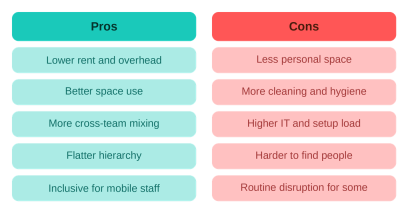
Of course, hot desking is not all roses. It’s better to be familiar with the downsides so that you can watch out for them or even prepare to address them from the outset. Some of the disadvantages most frequently reported by companies include:
Employees may come to experience their workplace as less personalized due to the lack of assigned places. If the office starts lacking character, it may feel sterile and alien which can affect company culture and people’s sense of belonging to the company. This, in turn, can impact productivity and work satisfaction.
Yes, the greater equality promoted by hot desking may be experienced as an unwelcome form of disruption in companies that have more rigid and vertical structures. If your company strongly emphasizes distinctions between employees, managers, and executives, a hot desking approach will need to be tailored to accommodate this feature.
While hot desking may decrease office utilization and employee overhead costs it can potentially increase IT-related costs. Or, at the least, it is likely to stretch an IT department’s resources.
One of the tools available to manage the situation is to introduce hot desk booking software. Such a system will open up IT resources for managing the new office setup, such as maintaining workstations and networks, while employees are given the freedom to choose their desks themselves.
To create the neat and tidy environment that hot desking promises, you may need to implement new health, safety, and cleaning policies that will maintain impeccable hygiene. This will require employees to exercise greater care and responsibility and possibly develop new habits.
Furthermore, you must also consider those employees that have more particular needs. In a traditional setting, employees with special needs have a guaranteed workplace that is tailored to them.
You will need some special hot desking accessories. In a hot-desking environment, you will need to introduce changes that allow them to participate as easily as before.
By the way, you can easily do that with a desk booking system at no cost.
Employees who are used to a routine and a fixed setup and those who feel a need for greater privacy will experience some disruption. While they may be able to adapt, such disruptions may lead to dips in productivity. Be prepared to experience some turbulence in the meantime!
Read more in our guide to managing hot desking.
While communication may ultimately improve, in the beginning, it may occasionally break down. With people located in different places each day, tracking employees down can become difficult. To deal with the situation, you will likely need to set up new communication channels and policies to make sure that important messaging reaches everyone concerned.
This is less of an issue if you already have remote work policies in place, since those require reliable communication channels. For more, see our article on the differences between hot desking and activity-based working.
Hot desking succeeds or fails on the details. A few practices that help:

One way to find out is to run a survey among your employees. With that input, you may conclude that your company is fit for the change and that the benefits outweigh the drawbacks. Or you may find there is little support for this type of arrangement.
You can also try hot desking on a smaller scale, such as with one team, before deciding about the whole company. If it doesn’t work out, you can scale back to your usual arrangement.
Hot desking isn’t for everyone. Whether it is right for your company depends on your culture and how used to the office your employees are. You should also weigh how much value people place on having a separate, individual space. The point of hot desking is to improve productivity, collaboration, and communication, and that is what you need to keep in mind when coming to a decision.
Hot desking is when employees share a pool of unassigned desks instead of each having their own. People either book a desk in advance or take any open one when they arrive.
The main pros are lower real estate and overhead costs, better use of space, and more mixing across teams. The main cons are less personal space, added hygiene and IT demands, and disruption for people who like a fixed routine.
They are close but not identical. Hoteling always uses booking for a set time, while hot desking can also be first-come, first-served.
It can. CBRE’s 2026 workplace benchmarking puts average office utilization at about 53%, so cutting desks to match real attendance lowers rent, furniture, and cleaning costs. The savings shrink if you over-cut and people can’t find a seat on busy days
It depends on how many people come in on a typical day. Track attendance for a few weeks, then set the number of desks to cover your busy days with a small buffer, and adjust as the data changes.
Teams that need the same specialized setup every day, roles that handle sensitive physical documents, and workplaces with strict hierarchy or fixed accessibility needs tend to struggle with it.
At OfficeRnD, we help companies move to hot desking and hybrid ways of working. If you’re curious what the OfficeRnD Workplace software can do for you, check out the product features or book your demo to see the platform in action.


![The Hybrid Work Trends That Will Shape 2027 [Webinar]](https://www.officernd.com/wp-content/uploads/2026/11/The-Hybrid-Work-Trends-2027-1-336x150.png)

Eager to learn the real flex and coworking space trends for 2027 without the hype? Read on.
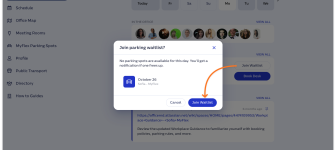
Book a desk and parking spot in one flow, and join a waitlist when the car park is full.

Compare 6 Skedda alternatives on price, IT fit and G2 reviews.
![14 Best Space Management Software Tested and Compared [2026]](https://www.officernd.com/wp-content/uploads/2022/07/Manage-Shared-Seating.png)
The best space management software in 2026 is OfficeRnD Workplace. This is a complete buyer's guide.

The average flex operator connects 1.65 of 5 core systems. See what the gap costs and how to fix it.